
columns-[Video Included]
Sometimes lines on an invoice are not picked up correctly. If it’s a long invoice, having to tell ABBYY what to pick up on every line would be very time consuming. Thankfully you only have to tell ABBYY what to find on the first line and then let it figure out the rest!
The following video is giving an example where some information is missing from a line, but most of the line has been picked up correctly.
You can follow the same method even if no table has been picked up at all!
Click Add ‘Line Items’, select all the information you want collected from the first line and then continue with the instructions in the video.
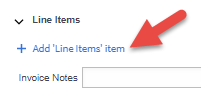
Watch the video below to see how to do it.
 Welcome to Fetch Help
March 22, 2023
Welcome to Fetch Help
March 22, 2023
 When invoices pages are merged or split incorrectly
May 31, 2024
When invoices pages are merged or split incorrectly
May 31, 2024
 Changing Approvals Criteria for Invoices in Fetch Approvals
April 24, 2024
Changing Approvals Criteria for Invoices in Fetch Approvals
April 24, 2024
 Setting up a new Workflow in Fetch Approvals
April 24, 2024
Setting up a new Workflow in Fetch Approvals
April 24, 2024
 Adding a new user in Fetch Approvals
April 24, 2024
Fetch Approvals for Admin Team
January 4, 2024
Adding a new user in Fetch Approvals
April 24, 2024
Fetch Approvals for Admin Team
January 4, 2024
Comment
Leave a Reply