
If a Project Number has been captured on an invoice, the lines will be copied to all the lines of the invoice.
In the event that an incorrect number has been captured, you will want to replace these values.
Tick the box to replace the Project No on Lines and then either recapture or type the correct number in the Project No Box.
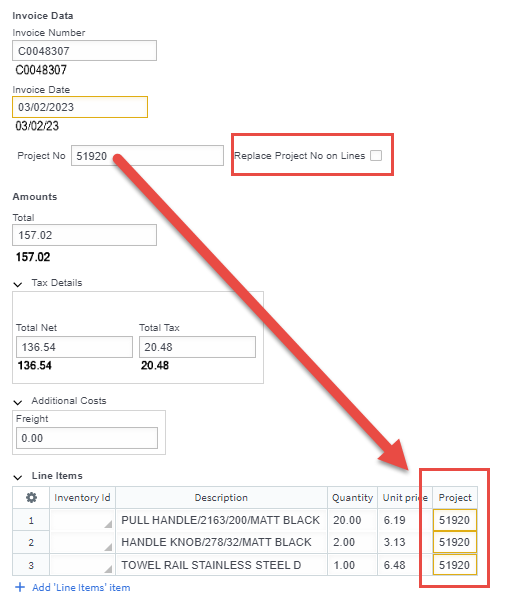
If there are any lines you want to change the value of, you will need to untick the box before typing them in.
 Welcome to Fetch Help
March 22, 2023
Welcome to Fetch Help
March 22, 2023
 When invoices pages are merged or split incorrectly
May 31, 2024
When invoices pages are merged or split incorrectly
May 31, 2024
 Changing Approvals Criteria for Invoices in Fetch Approvals
April 24, 2024
Changing Approvals Criteria for Invoices in Fetch Approvals
April 24, 2024
 Setting up a new Workflow in Fetch Approvals
April 24, 2024
Setting up a new Workflow in Fetch Approvals
April 24, 2024
 Adding a new user in Fetch Approvals
April 24, 2024
Fetch Approvals for Admin Team
January 4, 2024
Adding a new user in Fetch Approvals
April 24, 2024
Fetch Approvals for Admin Team
January 4, 2024
Comment
Leave a Reply