
Once an invoice has been fully processed the image of that invoice is exported to a folder in PDF/A (Archivable PDF) format in a folder structure specified at the time of setting up Fetch for your company.

The pdf can be accessed from within Exo on the Transactions Tab, or from the folder directly.
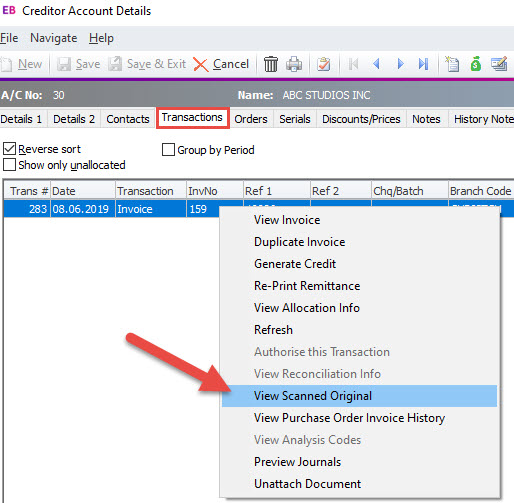
To access from within Exo, Right click a transaction and select View Scanned Original.
To access the actual folder all pdfs are stored in, this will be most likely located where your SQL backups are kept. If you are not sure please contact Focus and they will be able to let you know how to access it for your particular site.
It is vital that these invoices are backed up in multiple locations regularly. They need to be kept for 7 years for the IRD. Focus offers a robust backup service to provide maximum peace of mind. Please let us know if we can help with this.
 Welcome to Fetch Help
March 22, 2023
Welcome to Fetch Help
March 22, 2023
 When invoices pages are merged or split incorrectly
May 31, 2024
When invoices pages are merged or split incorrectly
May 31, 2024
 Changing Approvals Criteria for Invoices in Fetch Approvals
April 24, 2024
Changing Approvals Criteria for Invoices in Fetch Approvals
April 24, 2024
 Setting up a new Workflow in Fetch Approvals
April 24, 2024
Setting up a new Workflow in Fetch Approvals
April 24, 2024
 Adding a new user in Fetch Approvals
April 24, 2024
Fetch Approvals for Admin Team
January 4, 2024
Adding a new user in Fetch Approvals
April 24, 2024
Fetch Approvals for Admin Team
January 4, 2024
Comment
Leave a Reply