
You can use the web verification station for verifying invoices online from anywhere.
You will need an internet connection.
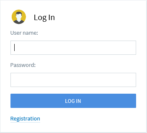
To log into the station, use http://portal.gofetch.net.nz/FlexiCapture12/Verification/TenantName
where TenantName is your company name as registered with us for ABBYY. If you are not sure what this is please contact your Fetch Consultant for the information.
For example: http://portal.gofetch.net.nz/FlexiCapture12/Login/Focus
We recommend you bookmark this for easy access.
You will be taken to a log in page where you can enter your log in credentials. You will then see the queues you have access to and any tasks that are waiting to be processed.
 Welcome to Fetch Help
March 22, 2023
Welcome to Fetch Help
March 22, 2023
 When invoices pages are merged or split incorrectly
May 31, 2024
When invoices pages are merged or split incorrectly
May 31, 2024
 Changing Approvals Criteria for Invoices in Fetch Approvals
April 24, 2024
Changing Approvals Criteria for Invoices in Fetch Approvals
April 24, 2024
 Setting up a new Workflow in Fetch Approvals
April 24, 2024
Setting up a new Workflow in Fetch Approvals
April 24, 2024
 Adding a new user in Fetch Approvals
April 24, 2024
Fetch Approvals for Admin Team
January 4, 2024
Adding a new user in Fetch Approvals
April 24, 2024
Fetch Approvals for Admin Team
January 4, 2024
Comment
Leave a Reply