
Fetch saves a copy of the invoice PDF with the Bill in MYOB Advanced. Sometimes this process can be interrupted and doesn’t complete. Here is why it happens and what to do about it.
There are two parts to this process.
If the process is interrupted the Bill may have created, but the invoice PDF doesn’t attach to the Bill in MYOB Advanced.
In this case, the invoice is moved to the Invoice For Review Tab in Fetch Advanced.

The Validation messages for the invoice will tell you that:
If you look in MYOB Advanced you will see that the invoice is there with no attachment.
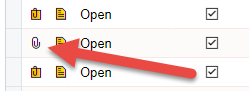
In Fetch Advanced (Invoices for Review Tab):
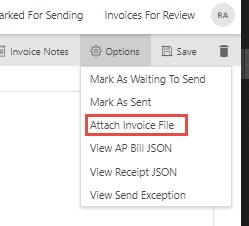
If you refresh the screen in MYOB Advanced you will see the invoice PDF is now attached.
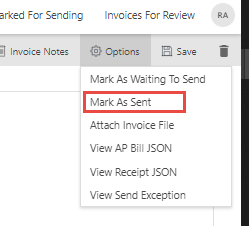
4. Select Mark As Sent. This will remove the invoice from the screen, but keep it in our database if you ever have any queries about it. Please do not simply delete the invoice as this will remove it with no record of it in Fetch.
 Welcome to Fetch Help
March 22, 2023
Welcome to Fetch Help
March 22, 2023
 When invoices pages are merged or split incorrectly
May 31, 2024
When invoices pages are merged or split incorrectly
May 31, 2024
 Changing Approvals Criteria for Invoices in Fetch Approvals
April 24, 2024
Changing Approvals Criteria for Invoices in Fetch Approvals
April 24, 2024
 Setting up a new Workflow in Fetch Approvals
April 24, 2024
Setting up a new Workflow in Fetch Approvals
April 24, 2024
 Adding a new user in Fetch Approvals
April 24, 2024
Fetch Approvals for Admin Team
January 4, 2024
Adding a new user in Fetch Approvals
April 24, 2024
Fetch Approvals for Admin Team
January 4, 2024
Comment
Leave a Reply