
If you see “Unknown Document” in the Processing Window, it means that the original email contained an attachment that was not an invoice (or ABBYY has not identified this document as an invoice).
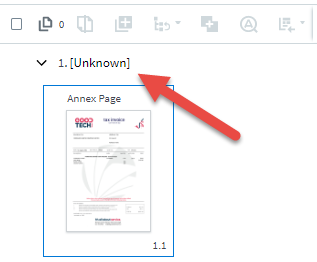
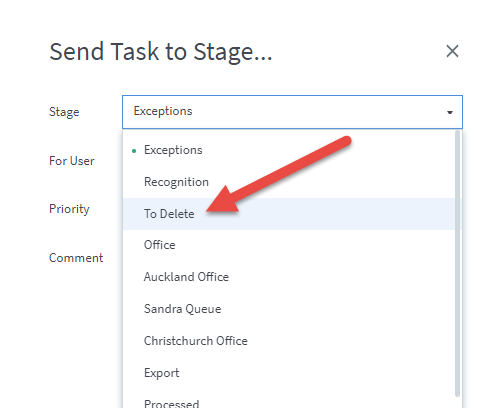
If the document is not an invoice, simply send the invoice to the “To Delete” queue and clear this queue at a later date.
You may want to find that email – it will be in the folder Fetch Failed or Fetch Processed in the email inbox that Fetch receives the documents from.
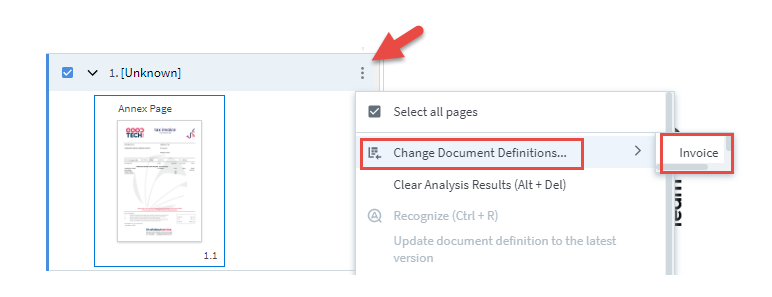
If the document is an invoice that ABBYY has just not recognised, you can force it to process the document.
Hover on the line that says “unknown” and 3 dots will appear at the end of the line. Select Change Document Definitions and then Invoice.
Click Recognize
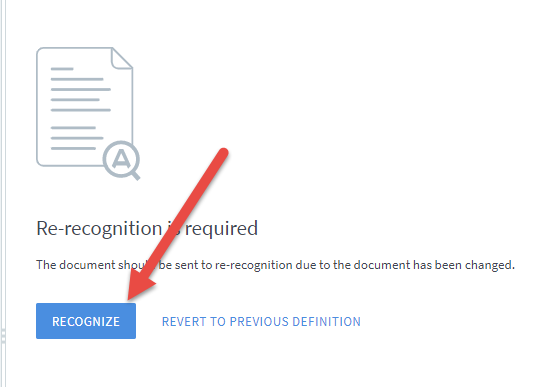
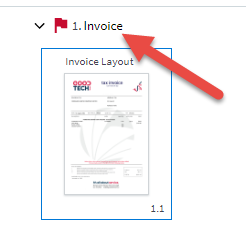
You will see that the document is now recognised as an Invoice, and the fields should have now been captured.
 Welcome to Fetch Help
March 22, 2023
Welcome to Fetch Help
March 22, 2023
 When invoices pages are merged or split incorrectly
May 31, 2024
When invoices pages are merged or split incorrectly
May 31, 2024
 Changing Approvals Criteria for Invoices in Fetch Approvals
April 24, 2024
Changing Approvals Criteria for Invoices in Fetch Approvals
April 24, 2024
 Setting up a new Workflow in Fetch Approvals
April 24, 2024
Setting up a new Workflow in Fetch Approvals
April 24, 2024
 Adding a new user in Fetch Approvals
April 24, 2024
Fetch Approvals for Admin Team
January 4, 2024
Adding a new user in Fetch Approvals
April 24, 2024
Fetch Approvals for Admin Team
January 4, 2024
Comment
Leave a Reply